· The duetpad team
What visual thinkers need from an AI canvas to succeed in 2026
91% of designers now use AI at least weekly. What visual thinkers really need is a canvas that keeps up — one shared space that remembers your project, so you stop re-briefing your AI every session.
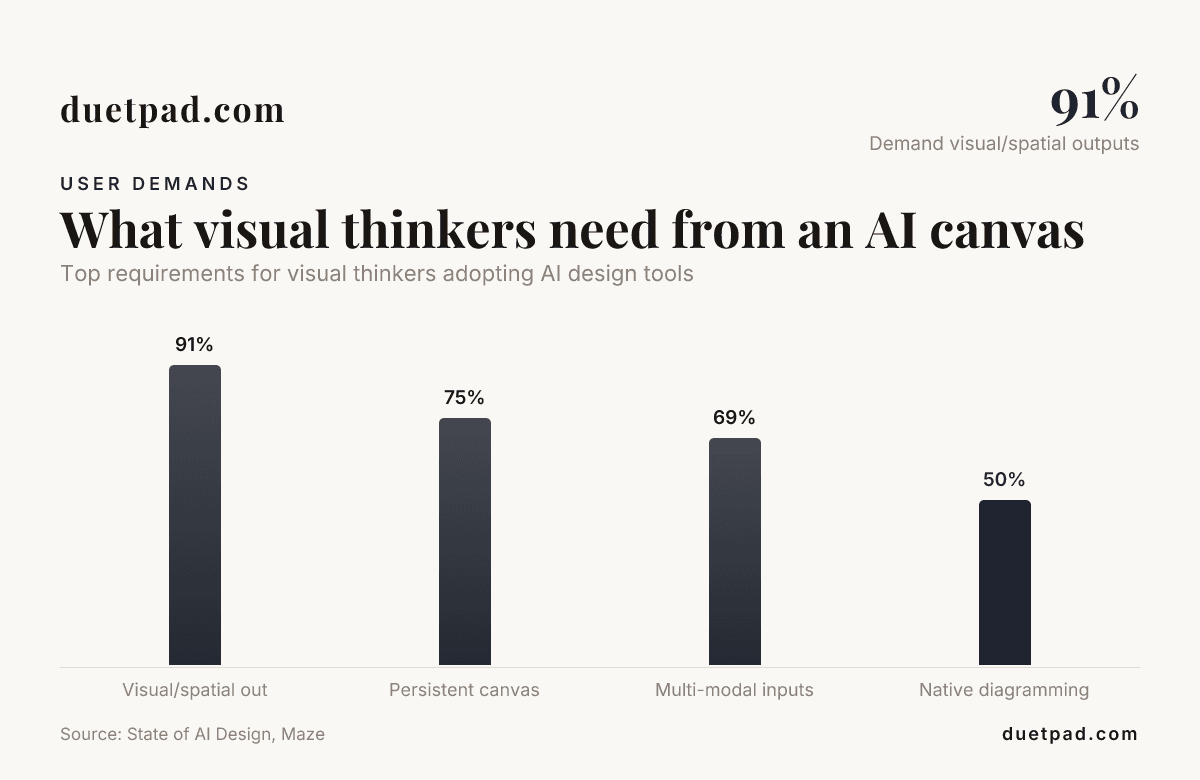
91% of designers now use AI in their design work at least weekly, according to the 2026 State of AI in Design report. When AI moves that fast, what visual thinkers need from an AI canvas to succeed is a space that keeps up with them, not another sandbox that forgets your project. Watch your AI think on a canvas instead. Stop re-briefing your AI every session. You need one shared canvas that actually remembers what you are building.
Key takeaways
| Visual thinker need | Why it matters | How duetpad delivers |
|---|---|---|
| Persistent memory | Stops you explaining your project from scratch every time you open a chat. | Your AI reads the whole canvas on the first turn of every session. |
| Bring your own AI | Separates the cost of the interface from the cost of the model. | Bring your own Claude (Pro or Max); we charge for the canvas, not the intelligence. See our pricing. |
| No overwriting | You can't lose a sentence mid-keystroke when the AI jumps in. | Your AI's changes never overwrite a field while your cursor's in it. |
| Live sync to terminal | Connects visual ideation directly to your codebase. | What you shape on the canvas, your AI uses in the terminal. |
Stop re-briefing: the core of what visual thinkers need
Visual thinkers work in maps, webs, and non-linear structures. When you force that kind of thinking into a linear chat window, you lose the context.
Your AI needs to see the whole board to give you one clear action this week. duetpad keeps your ideas, plans, and docs in one place your AI reads on the first turn of every session.
Stop re-briefing. Just open the canvas and start working. The memory of your project stays on the workspace you control. It is private by default.
Why an AI canvas must replace fragmented tools
Visual thinkers already juggle too many tabs. You have a doc for notes, a board for mapping, a chat for AI, and a terminal for code. This fragmentation kills momentum.
One shared canvas replaces the noise. Pair your AI with your visual workspace and cut the tool sprawl. Bring everything into one place, and keep it in sync.
Bring your own Claude: what visual thinkers need from an AI canvas
You already pay for powerful AI. Do not pay for it again just to use a specific interface. Bring your own Claude (Pro or Max); we charge for the canvas, not the intelligence.
Connect any AI that speaks MCP. It gives you one line, copy it, paste it in the terminal where Claude Code runs. That registers duetpad with your AI; no keys to wrangle.
Ask your AI to read, write, and build alongside you. What you shape here, it uses in the terminal. The canvas becomes a shared space, not just a prompt box. Read more in our FAQ.
Canva AI vs. a shared canvas for you and your AI
Tools like Canva AI have pushed design accessibility forward. You can use a Canva AI generator to spin up a quick graphic, or rely on Canva AI tools to format text. Canva's AI integrations are great for marketing assets. The Canva AI writer and text features help you draft copy fast.
But visual thinkers building software, products, or complex systems need something different. Canva and AI work together for output, but what visual thinkers need from an AI canvas is a space for input and context. You need a map, not a slide.
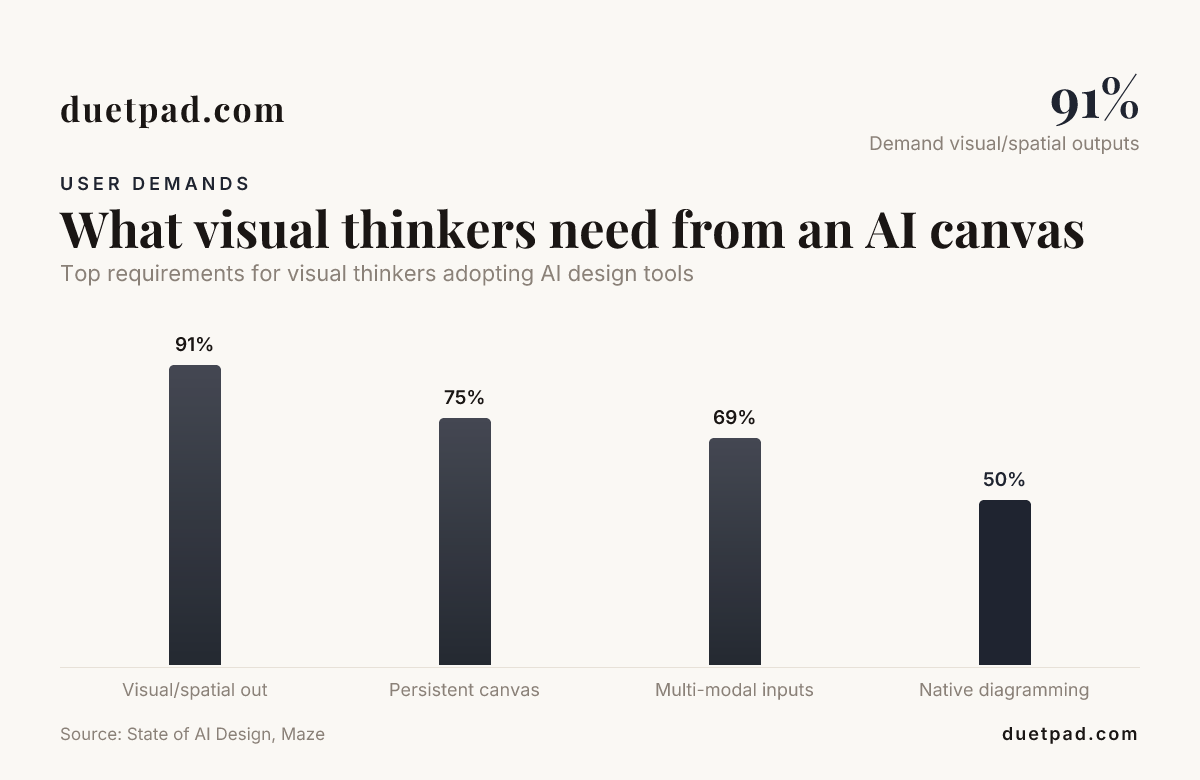
Top requirements for visual thinkers adopting AI design tools.
A shared canvas links personas, jobs to be done, and journeys. It is a workspace where the AI actually understands the relationship between those elements. Explore the features that make this possible.
One shared canvas, no overwriting
Collaboration with AI can feel dangerous. You type a thought, and the AI wipes it out to "help" you. We fixed that.
Whatever you're typing stays yours. Your AI's changes never overwrite a field while your cursor's in it. You'll never lose a sentence mid-keystroke.
Your AI works the same board you do, picking up your changes each time it acts — so you build on one canvas without stepping on each other. This safety is exactly what visual thinkers need from an AI canvas to succeed.
From visual canvas to terminal: building with your AI
Visual thinkers need to see the big picture, but they also need to ship. An idea on a canvas is only useful if it reaches the code.
Export the canvas into a brief (CLAUDE.md) and scaffolds for your repo. Your AI reads the brief and starts building. You stay in the terminal, your AI stays in sync with the canvas.
This bridge between visual planning and code execution is critical. Check our getting started guide to connect your workspace today.
Pricing: an AI canvas you can afford
Complex tools usually mean complex pricing. We keep it simple. No card to start a 14-day free trial.
You bring your own AI, so you only pay for the canvas. Choose a monthly plan for $24, or save with the yearly plan at $228 — that's $19/mo billed yearly. You can also grab the beta deal for a one-time payment of $75.
Unlimited projects, memory graph, and build exports are included. Review the details on our pricing page.
Conclusion
What visual thinkers need from an AI canvas to succeed is simple. They need memory, live sync, and a tool that stays out of the way while they type. Stop re-briefing your AI every session and start building on one shared canvas.
Bring your own Claude, paste one line in the terminal, and let your AI read the whole board. You shape the ideas, and your AI builds them. That is what visual thinkers need from an AI canvas to succeed in 2026.
Frequently asked questions
What do visual thinkers need from an AI canvas to succeed in 2026?
Visual thinkers need persistent memory, live sync without overwriting, and a direct bridge to the terminal. The canvas must act as a shared space where the AI reads the full context on the first turn.
How is an AI canvas different from Canva AI tools?
While Canva AI focuses on generating and formatting visual assets, an AI canvas like duetpad focuses on project context, memory, and code scaffolding. It maps ideas and syncs them directly to your AI in the terminal.
Do I need to pay for AI usage separately on the canvas?
Yes. You bring your own AI (like Claude Pro or Max). We charge for the canvas and the memory graph, not the intelligence. This keeps costs transparent.
Can the AI overwrite my text while I am typing?
No. Your AI's changes never overwrite a field while your cursor's in it. You will never lose a sentence mid-keystroke.
How do I connect my AI to the canvas?
The system gives you one line. Copy it, paste it in the terminal where Claude Code runs. That registers the canvas with your AI; no keys to wrangle.
Is the AI canvas private?
Yes. Your canvas is private by default. We host your projects for you, but the work stays yours, and we do not use it for training.
What happens if I delete a card on the canvas?
You can restore removed cards up to 90 days later. This ensures you never lose a thought permanently while mapping out complex ideas.